
Parking Services
Please note, lot availabilities are subject to change due to weather, events, construction, etc… Parking advisories are distributed through Saint Rose email. If you have any questions please email transportation@strose.edu.
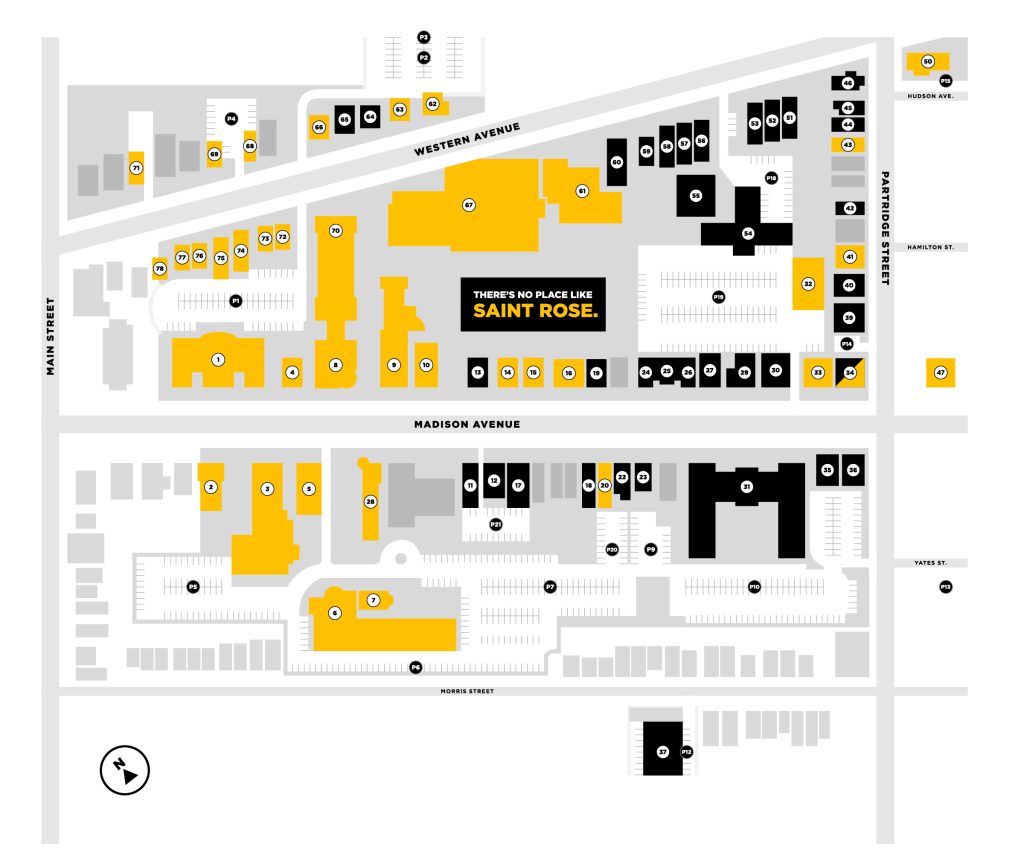
P1 – Lally Lot – Entrance found between 432 and 442 Western Ave.
- Staff and Visitors – 7:00AM – Midnight, 7 days a week
P2 – LaSalle Lot – Entrance found between 415 and 421 Western Ave.
- Staff and Residents – 24 Hours, 7 days a week
- Commuters and Visitors – 7:00AM – 11:00PM, 7 days a week
P3 – Rear LaSalle Lot – Entrance found at the rear of P2 (LaSalle Lot).
- Staff and Commuters – 5:00PM – 11:00PM, Monday – Friday
P4 – Entrance found between 423 and 429 Western Ave.
- Staff Only – 7:00AM – 11:00PM, 7 days a week
P5 – Massry Lot – Entrance found between 994 and 1000 Madison Ave.
- Staff and Commuters – 7:00AM – 11:00PM, 7 days a week
P6 – Rear Hearst Lot – Entrance found between 994 and 1000 Madison Ave.
- Staff and Commuters – 7:00AM – 11:00PM, 7 days a week
P7 – East Hearst Lot – Entrance found between 994 and 1000 Madison Ave.
- Staff and Commuters – 7:00AM – 11:00PM, 7 days a week
P9 – Entrance found at the east end of P7, located behind 950 Madison Ave.
- Residents – 24 Hours, 7 days a week
- Commuters – 7:00AM – 11:00PM, Monday – Friday
P10 – Centennial Lot – Entrance at the intersection of Yates St. and Partridge St.
- Residents – 24 Hours, 7 days a week
P12 – Morris Lot – Entrance at 568 Morris St.
- Residents – 24 Hours, 7 days a week
P13 – Entrance between 877 and 879 Madison Ave.
- Staff and Visitors – 7:00AM – 11:00PM, 7 days a week
P14 – Entrance between 917 Madison Ave and 212 Partridge St.
- Staff – 7:00AM – Midnight, 7 days a week
P15 – Campus Security – Entrance next to 553 Hudson Ave.
- Staff – 24 Hours, 7 days a week
P18 – Alumni Lot – Entrance between 358 and 368 Western Ave.
- Staff – 24 Hours, 7 days a week
P19 – Lima Lot – Entrance Between 919 and 921 Madison Ave.
- Staff and Residents – 24 Hours, 7 days a week
- Commuters and Visitors – 7:00AM – 11:00PM, 7 days a week
P20 – Entrance next to 956 Madison Ave.
- Residents – 24 Hours, 7 days a week
P21 – Entrance between 972 and 974 Madison
- Residents – 24 Hours, 7 days a week
- Vehicle hang tags are required on all vehicles and are not transferable. A valid driver’s license, vehicle registration, and current Saint Rose identification card (ID) are required to register a vehicle.
- All roads are designated as no parking areas.
- Do not park along islands or curbs, only in spaces designated with lines.
- Under no circumstance is faculty or staff members to purchase or loan a faculty or staff hang tag to another person.
- Commuter students may not park in College owned or leased parking lots between 11pm and 7am. Valid permit holders may obtain a temporary parking permit to allow overnight parking for school functions, computer lab use, or visiting a resident student.
- Parking outside of the times listed for each permit type is not allowed.
One rearview mirror hang-tag will only be issued to qualified full-time staff, part-time staff, commuter students and resident students, and will allow the vehicle owner to use the permit on any vehicle that they drive to campus.
Parking hang tags may only be purchased online using the link below. You will need your College ID and primary vehicle registration.
How do I get my parking pass?
- Students who live on campus will have it delivered to their campus mailboxes.
- Commuters will have it delivered to their address.
- Both part-time and full-time staff will have their permits mailed to their campus inter-office mail box.
- Commuter Meal Plan permits can be picked up at the Dining Hall.
Permit fees are as follows and payable by ACH, Visa and Master Card.
- $55 for commuter students
- $105 for resident students
- Hang tags may be moved from one vehicle to another of the same registered owner.
- Hang tags must be properly displayed when parked on campus. Hang tags must be hung on the rearview mirror above the dashboard. Hang tags correspond with the academic year, not the calendar year.
- All outstanding tickets must be paid prior to receiving a new hang tag.
- Any hang tag lost or stolen is the responsibility of the owner and replacements may be purchased at full price.
- Vehicles larger than one space may require more than one hang tag.
If you require temporary parking for business purposes please have a representative of the college, or yourself come to the Security Headquarters at 340 Western Avenue. These passes can be issued for a maximum of (7) days. The following information will need to be provided when obtaining a temporary parking permit:
- Nature/Location of your business/visit
- Vehicle Year/Make/Model/Color
- License Plate number
The College of Saint Rose provides handicapped parking spaces in all lots across campus. Only vehicles exhibiting official state issued or official local government issued handicapped permits along with a valid College hang tag will be permitted to park in designated handicapped parking spaces.
These state or local handicapped permits will only be recognized when the person to whom it was issued is present. The College of Saint Rose does not issue handicapped parking permits.
Fines vary from $50 to $100 depending on the violation. Fines must be paid within 14 days of issuance. Appeals must be submitted to the Department of Safety and Security within the same 14 days.
Failure to pay the fine or submit the appeal within 14 days will result in an additional $50 to $100 fine per violation depending on the violation. Violators with 4 or more outstanding violations may also be subject to additional fees and have their vehicle immobilized.
Please note: you must have your ticket when paying online. You will need to take information from it to pay. If you do not have your ticket, please go to the Security Headquarters at 340 Western Avenue to pay your ticket. If you have any questions, please email transportation@strose.edu.
Vehicles with multiple outstanding parking violations will be immobilized. In order for the immobilizer to be removed, all outstanding fines must be paid at Security Headquarters, 340 Western Avenue. Security can accept fines and remove the boot 24 hours/7 days a week.
You have the right to appeal your parking violation if you believe the ticket was issued in error. You may stop into Security Headquarters, 340 Western Avenue, and request the parking ticket appeal form or download a copy below. The appeal form must be fully completed with a current mailing address. You must include the ticket when submitting the form.
Please complete this form and mail it to:
The College of Saint Rose
Attn: Safety and Security Department
432 Western Avenue
Albany, NY 12203-1490
Be sure to include your ticket when you mail this form. Incomplete forms will not be processed.
The parking appeals committee is made up of a group of faculty, staff and administrators who meet regularly to consider all parking violation appeals. After the committee meets, you will receive their decision by email. If accepted, no further action is needed. If denied, you must pay the parking violation. All decisions by the parking appeals committee are final.
All individuals parking on campus are required to observe and obey emergency snow removal policies as posted by the Department of Safety and Security. Failure to comply may result in vehicles being removed from campus at the owner’s expense. Additionally, the City of Albany may declare snow emergencies. The City phone number for snow emergency information is 476-SNOW.
After unusually heavy snow events (typically, but not limited to accumulations >6”), the Security Department will work in conjunction with Facilities to empty and temporarily close certain parking lots so that they can be cleared of built-up snow accumulation.
Please note that during school recess periods, all student cars left on campus should be parked in the Centennial Hall parking lot.
The Albany Police may ticket or tow your vehicle if parked illegally on city streets. Read all traffic control signs carefully.
